Table of Contents
Server Modpack & Guide
Welcome to the server! To play, you need to install our custom Fabric modpack. This guide will walk you through exactly what you need to do, step-by-step. Let's keep this simple.
Server IP: mc.thehokage.cc
If you get an error joining the server try again!
1. How to Install the Modpack
Step 1: Download the Modpack Download the server modpack file here: Download Server Modpack
Step 2: Download Minecraft Launcher
- Download the PineconeMC installer here: Pinecone MC
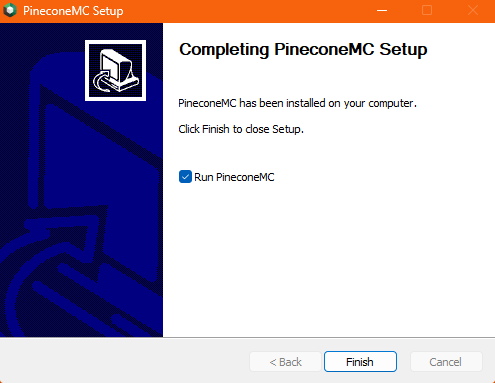
- Run the installer, go through the installer, and hit “Finish”.
Step 3: Logging In
- Open PineconeMC.
- Click “Accounts” on the top right of the window.
- Click “Manage Accounts…” in the drop down.
- Click “Add Microsoft” if you have a official Minecraft Account and login.
- Click “Add Offline” if you do not have a official Minecraft Account and make up a username.
Step 4: Add the Mods
- Click “Add Instance” on the top left of the window.
- Click “Import” on the left sidebar of the new window.
- Click browse and select the previously downloaded modpack.
(Note: Add screenshot here)
The Client Modpack Guide
This is the full list of mods included in your download and what they actually do for you in the game.
New Gameplay & Content
These mods add brand new items, mechanics, and things to do in the world.
- Farmer's Delight: A massive farming and cooking expansion. Grow new crops, cook meals in a pot, and carve meat on a cutting board.
- Immersive Armors: Adds a bunch of cool, visually distinct armor sets to craft and wear.
- Traveler's Backpack: Craftable, wearable backpacks so you can carry more loot. They even have tanks for holding water or lava!
- Waystones: Find or craft stone monuments that allow you to teleport and fast-travel between them.
- GuardVillagers: Villages now have actual guards to defend against zombies and raids.
- Lootr: Fixes multiplayer looting! Chests in dungeons have separate loot for *every* player. If someone finds a dungeon before you, you can still open the chest and get your own items.
- Gravestones: When you die, all your items are safely stored in a gravestone at your death location instead of burning in lava or despawning.
- Bartering Station: Makes trading with Piglins in the Nether much easier and less messy.
- Easy Magic: Makes enchanting tables hold onto your lapis and items so they don't pop out when you close the menu.
- Shippy Ships: Fully functional sailing vessels with smooth animations and gameplay mechanics designed for immersion and to feel believable while staying fun and intuitive.
- Wide Mining: Adds an enchantment that lets you mine a 3×3 area with a single swing of a pickaxe, making mining significantly faster.
Quality of Life (Making Life Easier)
Helpful tweaks so you spend less time frustrated and more time playing.
- Xaero's Minimap & World Map: Adds a detailed minimap to your HUD and a full-screen map (press 'M'). Because our server terrain is already pre-generated, these maps will load in very smoothly as you explore without causing lag.
- Just Enough Items (JEI): The ultimate recipe book. Press 'E' to open your inventory and look at the right side of the screen to see how to craft literally anything.
- AppleSkin: Shows you exactly how much hunger a piece of food will restore before you eat it.
- Jade: A small popup at the top of your screen that tells you exactly what block you are looking at, or how much health a mob has.
- Veinminer: Hold down the grave key (usually `~`) while breaking a block to mine the entire ore vein, or chop down a whole tree with one swing.
- Inventory Management: Adds buttons to your inventory and chests to instantly sort your items so they aren't a mess.
- TrashSlot: Adds a tiny trash can to your inventory to permanently delete junk blocks you don't want.
- Zoomify: Press 'C' to zoom in your camera like a telescope.
- Controlify: Lets you play Minecraft perfectly with an Xbox, PlayStation, or Switch controller.
- More Chat History: Lets you scroll way further up in the chat box to see what people said earlier.
- No Chat Reports: Keeps our server chat completely private from Microsoft's chat-reporting system.
Graphics & Visuals (Eye Candy)
These make the game look incredibly beautiful.
- Distant Horizons: An incredible visual mod that lets you see infinitely far away (massive render distances) without melting your computer.
- Iris: Adds support for custom lighting shaders.
- Continuity: Makes blocks like glass connect seamlessly without ugly borders in between them.
- BetterGrassify: Makes grass blocks look fuller and fluffier.
- LambDynamicLights: Holding a torch in your hand will actually light up the area around you as you walk!
- Entity Model & Texture Features (EMF/ETF): Adds extra animations and texture variations to mobs so they don't all look identical.
- SkinShuffle & Cape Provider: Lets you easily change your skin in-game and see custom player capes.
- Skyboxify: Adds beautiful custom skies, clouds, and stars.
- Gamma Utils: Gives you a hotkey (g) to toggle full brightness so you can see perfectly in dark caves.
- Cubes Without Borders: Gives you a borderless-windowed mode so you can easily tab out to Discord.
Performance Boosters
You don't need to touch these! They just run in the background to make sure your game runs at 144+ FPS without lagging, freezing, or eating up all your RAM.
- Sodium, Lithium, & FerriteCore: The holy trinity of Minecraft optimization. They completely rewrite how the game renders graphics and uses memory.
- EntityCulling & More Culling: Stops your computer from rendering blocks and mobs that are hidden behind walls, saving massive amounts of FPS.
- Dynamic FPS: Drops your framerate automatically if you tab out of the game so it doesn't cook your graphics card in the background.
- ModernFix & ImmediatelyFast: Speeds up how fast the game launches and how fast menus open.
Libraries & Fixes
Ignore these! They are core coding libraries and API files that the mods above need in order to function. Never delete them or your game will crash.
- Fabric API, Fabric Language Kotlin, Cloth Config, Config Manager, Balm, BBE, Crash Assistant, Debugify, Forge Config API Port, IngeniumAPI, Ixeris, Language Reload, Main Menu Credits, Mod Menu, OptiGUI, Paginated Advancements, Placeholder API, PneumonoCore, Polytone, Puzzle, Puzzles Lib, Reese's Sodium Options, Remove Reloading Screen, Shogi, Sodium Extra, Sodium Shadowy Path Blocks, YetAnotherConfigLib, e4mc.